The Offline Book Reader With AI: Import Any PDF or EPUB and Search Across Your Entire Library
Import PDFs, EPUBs, TXT, and DOCX files into one offline library. Then ask questions across all your books and get AI-powered answers with citations. No internet, no subscription, no cloud.

You have books scattered everywhere. PDFs in your Downloads folder. EPUBs from Humble Bundle. A DOCX manual from work. Reference guides saved from government websites. Textbooks you bought for a class. Cookbooks, field guides, religious texts, technical manuals.
Some are on your phone. Some are on your laptop. Some are in apps that require internet, accounts, or subscriptions to access your own files. And when you need to find something specific across all of them, good luck. You're opening files one by one, scrolling, searching with Ctrl+F, and hoping you remember which book had the information.
There's a better way. Import all your books into one offline library, and let AI search across every page of every book to answer your questions with sourced citations.
The Problem With Most Reading Apps
Most ebook readers do one thing well: display text. But they fall short in ways that matter:
Kindle: Locked to Amazon's ecosystem. Books you buy are licensed, not owned. Requires internet for sync. Can't import arbitrary PDFs or EPUBs easily. No cross-book search beyond Amazon's catalog.
Apple Books: Better for imports, but still tied to iCloud. No AI-powered search. Limited format support. Syncing requires Apple ID and internet.
Google Play Books: Upload PDFs, but they live in Google's cloud. Requires Google account and internet to access your own library. No cross-book AI search.
Generic PDF readers: Open one file at a time. No library organization. No bookmarks across documents. Certainly no AI that can search across multiple files.
The pattern: most reading apps either lock you into an ecosystem, require internet, demand accounts, or don't let you search across your collection intelligently.
What an Offline AI Book Reader Looks Like
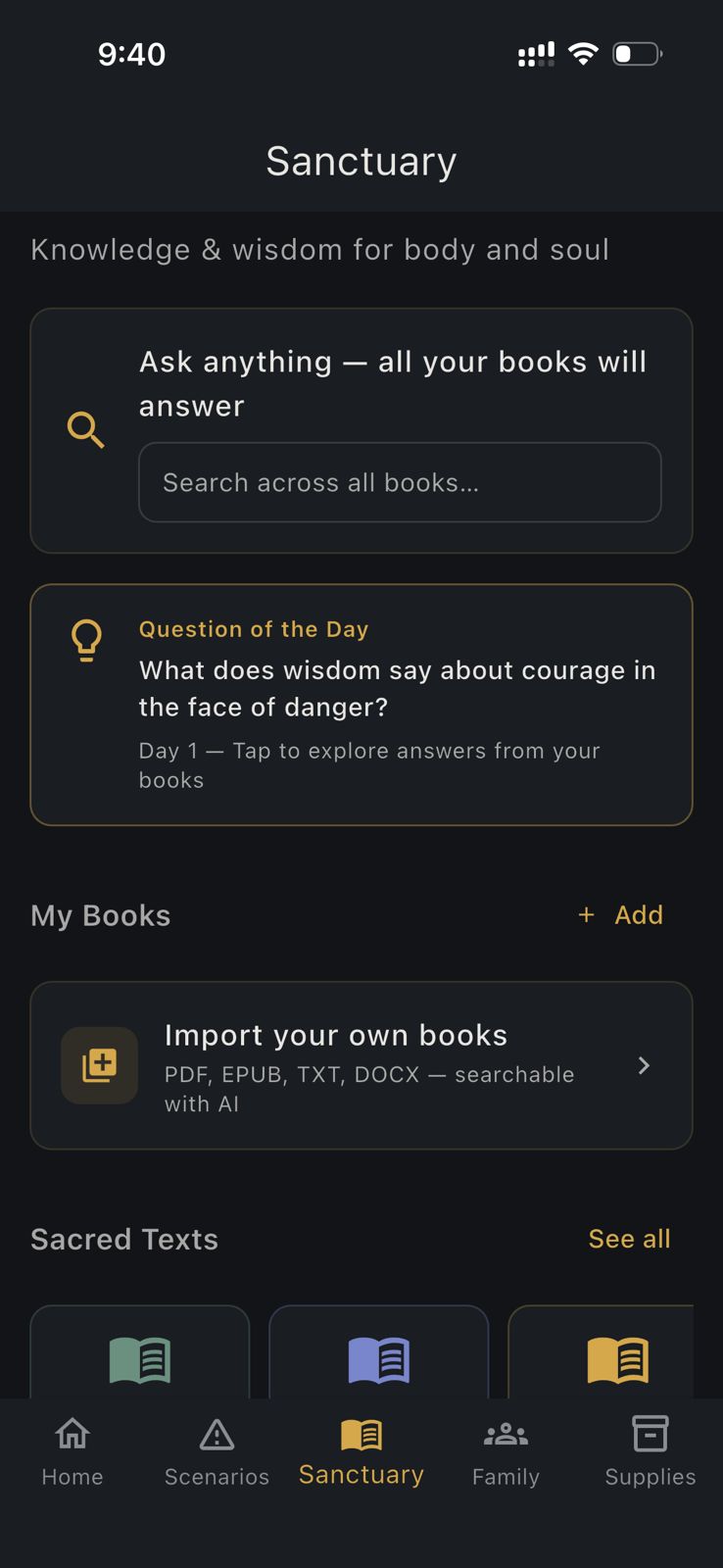
HAVEN's Sanctuary feature is a local-first reading platform with AI-powered search across your entire library. Here's what it does:
Import Anything
- PDF: Technical manuals, textbooks, government publications, scanned documents (text-extractable)
- EPUB: Ebooks from any source, DRM-free purchases, free library downloads
- TXT: Plain text files, notes, exported content
- DOCX: Word documents, reports, reference material
Drag files from your phone's storage or share them directly to HAVEN. They're stored locally on your device. No cloud upload. No sync service. No account.
Read Offline With Real Features
- Chapter navigation: Jump between sections without scrolling through the entire document
- Bookmarks: Mark important pages and sections across any book. Come back to them instantly.
- Reading assistant: Select a passage and ask the AI to explain it, summarize it, translate it, or connect it to other concepts
- Clean reading interface: No ads, no social features, no "you might also like" recommendations
19 Built-In Illustrated Books
Beyond your imports, HAVEN includes a curated library of practical reference books:
- Medical and first aid references
- Food preservation and cooking
- Homesteading and gardening
- Construction and building techniques
- Wilderness skills and navigation
- Philosophy and decision-making frameworks
- And more
These are always available, fully offline, and don't count against any storage or import limits.
Sacred Texts: Free Forever
Every major sacred text is available with no restrictions:
- Quran (multiple translations and Arabic text)
- Bible (KJV, NIV, ESV, and more)
- Torah
- Bhagavad Gita
- Dhammapada
- Guru Granth Sahib
- Additional texts across faith traditions
No account required. No subscription. No ads. These are treated as universal knowledge that should be freely accessible to everyone.
Ask The Books: AI-Powered Cross-Library Search
This is the feature that changes how you use a reading app.
Ask The Books lets you type a question in natural language, and the AI searches across every book in your library to find relevant passages. It then synthesizes an answer grounded in your actual sources, with citations pointing you to the exact book and section.
How It Works
1. You type a question: "What are the signs of dehydration in children?"
2. The AI searches your entire library using keyword matching (BM25 algorithm) to find the most relevant passages across all your books
3. If you have an AI model downloaded, it reads those passages and generates a synthesized answer, citing each source as [1], [2], etc.
4. You see the answer with sources, and can tap any citation to go directly to that passage in the original book
Real Examples
Student with imported textbooks:
- Import three biology textbooks as PDFs
- Ask: "How does mRNA differ from tRNA in protein synthesis?"
- Get an answer that pulls relevant passages from all three books, each citing a different perspective or level of detail
Home cook with recipe collections:
- Import five cookbooks as EPUBs and PDFs
- Ask: "What temperature and time for braising beef short ribs?"
- Get techniques and times from multiple cookbooks, with citations to compare approaches
Religious study:
- Have the Quran, Bible, and Bhagavad Gita in your library
- Ask: "What do different traditions say about patience during hardship?"
- Get relevant passages from each text, cited by book and section
Professional with technical manuals:
- Import equipment manuals, code standards, and reference guides as PDFs
- Ask: "What's the maximum span for a 2x10 floor joist at 16-inch centers?"
- Get the answer pulled directly from your building code reference, with the exact section cited
Self-learner with reference material:
- Import language learning guides, grammar references, and phrase books
- Ask: "How do I form the past tense in French for irregular verbs?"
- Get explanations from your grammar reference with examples
Without AI
If you haven't downloaded an AI model (or prefer not to), Ask The Books still works as a keyword search engine across your library. You get the relevant passages without the AI synthesis. The search itself doesn't require AI; the model only adds the natural-language answer layer on top.
The Reading Assistant
While reading any book, you can select a passage and ask the AI about it:
- "Explain this": Break down complex text into simpler language
- "Summarize": Get the key points of a long section
- "Translate": Understand passages in unfamiliar language
- "What does this mean?": Context, interpretation, and connection to broader themes
- "How does this relate to...": Connect the passage to other concepts you're studying
The assistant generates short, focused responses (roughly 100 words) that help you understand what you're reading without leaving the page.
Privacy: Your Reading Is Yours
What you read is deeply personal. Your reading habits reveal your interests, concerns, beliefs, political leanings, health worries, and intellectual curiosities. Most reading apps track all of this.
HAVEN doesn't:
- No account required: Read without identifying yourself
- No reading analytics: No one tracks what you read, how long you read, or what you highlight
- No cloud sync: Your books live on your device, not on a company's server
- No recommendations engine: No algorithm analyzing your reading to sell you more
- No ads: Zero advertising in the reading experience
- AI runs locally: Your questions to Ask The Books and the reading assistant are processed on your phone. No server ever sees them.
Who This Is For
Students: Import course materials, textbooks, and lecture notes. Search across everything with AI. Study without internet.
Researchers: Build a local reference library of papers, manuals, and publications. Query across them instantly.
Religious practitioners: Daily scripture study with AI-assisted passage discussion. Every major sacred text, free forever.
Professionals: Keep technical manuals, standards, and reference guides accessible offline. Search across them in the field.
Avid readers: One app for all your ebooks. No ecosystem lock-in. No subscriptions. Import from anywhere.
Privacy-conscious readers: Read what you want without anyone tracking your library or reading habits.
Travelers and off-grid users: A complete library that works without internet. Load it up before you leave signal.
What You Need
Free tier:
- 1 survival book from the built-in library
- 2 user-uploaded documents
- All sacred texts (unlimited, always free)
- Ask The Books keyword search
- Ask The Books AI search (requires a downloaded AI model)
- 15 AI messages per day (includes reading assistant)
- Bookmarks
Pro ($24.99 one-time, not a subscription):
- Unlimited books from the built-in library
- Unlimited document imports
- Unlimited AI messages
- Everything else in the free tier
No account needed for the free tier. Import a couple of PDFs, try Ask The Books, and see if it fits how you read.
Getting Started
1. Download HAVEN (free, no account)
2. Open Sanctuary from the home screen
3. Browse the built-in library or tap Import to add your own files
4. (Optional) Download an AI model from Settings > AI Models for AI-powered search and reading assistant
5. Start reading, or go to Ask The Books and ask a question across your library
Your books. Your phone. Your questions. No one else involved.
Ready to get prepared?
Carry on-device AI advice, offline topographic maps, and 12 printable field manuals on your phone with zero cell signal needed.