Know Your Family Got Home Safe, Without Tracking Every Step
Most family location apps show a dot that never stops moving. HAVEN's family timeline only records arrivals and departures at the places you choose, keeps them for 7 days, and encrypts them so only your family can read them.

"Did she get to school?" "Are you home yet?" "Where are you?" Most families send some version of these texts every day. Location apps were supposed to make them unnecessary, but many of them went too far the other way: a live dot on a map, a full trail of everywhere you drove, and a history that sits on a company's servers for months.
Quick answer: HAVEN's family timeline, part of Watch Family, shows only arrivals and departures at places your family saves, like Home, School and Work. You see who is where right now, what happened today, and up to 7 days back. It is end-to-end encrypted, deleted automatically after 7 days, and anyone in the family can pause or delete their own history.
What the family timeline shows
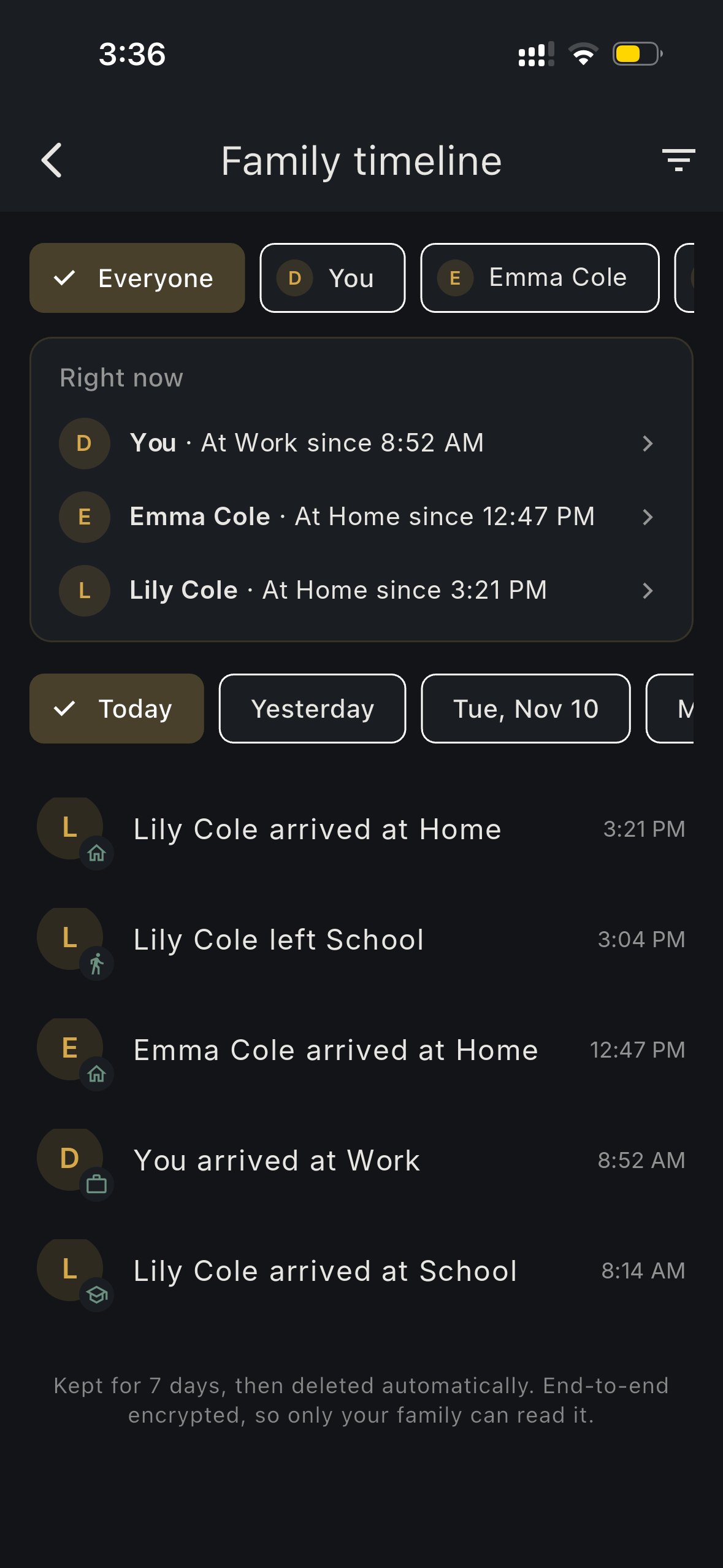
The timeline answers one question well: who got where, and when.
- Right now at the top lists each person and their current place: "At Work since 8:52 AM", "At Home since 3:21 PM".
- Today lists every arrival and departure in order: "Lily left School 3:04 PM", "Lily arrived at Home 3:21 PM".
- The last 7 days are one tap away. Filter by person, by day, or by place.
The same "Today" list appears on the Family screen, so a glance at the app tells you the day so far, without opening a map. Under each person's photo you also see a short status like "At Home" or "At School".
Why places, not a live trail
A live map is useful when something is wrong. On a normal day, most families do not need to know which road someone took. They need to know the important moments: the kids reached school, your partner left work, grandma got home from the store.
Recording only those moments has real benefits:
1. Less to worry about. "Arrived at School 8:14 AM" is calmer than watching a dot cross town.
2. Less to leak. A list of arrivals at a handful of places says far less about a person than a minute-by-minute GPS trail.
3. More trust in the family. Teenagers are much more willing to share "I got to practice" than their every move.
When you do need live location, HAVEN still has it: Watch Family includes the always-on live family map, and timed trip share and SOS live location are free for everyone.
How it works
1. Save your family places. On the Family screen, tap Family places and add Home, School, Work or any other spot. Use your current location or a saved pin, and set the radius.
2. Allow location "Always". Phones only report arrivals and departures in the background when location access is set to Always.
3. Go about your day. When someone crosses into or out of a place, an event is sealed on their phone and shared with the family. If a phone is offline, events wait on the device and send when the connection is back.
4. Get alerts if you want them. Place alerts can notify you the moment someone arrives or leaves.
Privacy built in, not bolted on
- End-to-end encrypted. Each event is encrypted on the phone for the family members' keys before it is uploaded. Nothing is uploaded in plain text, and HAVEN cannot read it.
- Kept for 7 days, then deleted. Old history is removed automatically.
- Pause any time. Pause your history for an hour, until tomorrow, or until you turn it back on. While paused, nothing is recorded or sent.
- Delete any time. Delete a single day or all of your history, for everyone in the family.
Who it is for
- Parents who want to know the kids reached school and came home, without a phone call.
- Couples who want "left work" to replace "on my way?" texts.
- Adult children keeping a gentle eye on parents who live alone.
- Preppers and planners, who already use HAVEN's family emergency plan and meeting points, and want everyday check-ins to happen on their own.
Getting it
The family timeline comes with Watch Family, which covers your whole Pro Family circle (up to 5 people) with one subscription and includes a free trial. It also includes everything in HAVEN Watch and full HAVEN Pro while you are subscribed. See plans and pricing or download HAVEN to set up your family places first.
FAQ
Q: Does HAVEN track my family's location all the time?
A: The family timeline only records arrivals and departures at places your family saves, such as Home, School and Work. It does not keep a GPS trail of every road. The separate live family map in Watch Family shows current location for members who share it.
Q: How long is family location history kept?
A: 7 days. After that, arrivals and departures are deleted automatically. Anyone can also delete a day or all of their own history at any time.
Q: Can HAVEN see where my family goes?
A: No. Each event is end-to-end encrypted on the phone for your family members' keys before it is uploaded, so only your family can read it.
Q: Can a family member turn the timeline off?
A: Yes. Anyone can pause their history for an hour, until tomorrow, or until they turn it back on. Nothing is recorded or sent while it is paused.
Q: Which plan includes the family timeline?
A: Watch Family. One subscription covers your Pro Family circle of up to 5 members and includes a free trial.
Ready to get prepared?
Carry on-device AI advice, offline topographic maps, and 12 printable field manuals on your phone with zero cell signal needed.