How to Text Without Service or Wi-Fi (iPhone & Android, 2026)
No bars, no Wi-Fi? Here are seven ways to text without service on iPhone and Android in 2026: Wi-Fi texting, satellite messaging, Bluetooth mesh apps, and what to do in an emergency.
No bars at a campsite, a dead zone at a concert, or a storm that knocks out the cell towers for a day. Each of these needs a different fix, and the right one depends on a simple question: what do you still have?
Quick answer: If you have Wi-Fi, turn on Wi-Fi Calling or use iMessage, RCS chat or WhatsApp. If you have no Wi-Fi but can see the sky, newer iPhones and some Android phones can text by satellite. If you have no Wi-Fi, no signal and no satellite, use a Bluetooth mesh messaging app like HAVEN to text people nearby, phone to phone, with no network at all. Set it up before you need it.
Which method works for you?
Swipe sideways to compare columns
| What you still have | What works | Reaches | Set up beforehand? |
|---|---|---|---|
| Wi-Fi, no cell signal | Wi-Fi Calling, iMessage, RCS, WhatsApp | Anyone | Turn on Wi-Fi Calling |
| Weak signal (one bar) | Plain SMS text | Anyone | No |
| Open sky, no signal, no Wi-Fi | Satellite texting | Anyone, or emergency services | Check your phone and carrier |
| Nothing at all, people nearby | HAVEN Bluetooth mesh | Nearby phones with the app | Install on every family phone |
| Nothing at all, longer range | LoRa mesh radio (Meshtastic) | Miles, with the radio | Buy and pair a device |
1. Text over Wi-Fi with Wi-Fi Calling
If you have Wi-Fi but no cell service (a basement, a rural house, a hotel abroad), your phone can send normal SMS texts through the Wi-Fi network using your carrier's Wi-Fi Calling feature. Your number and the person you text don't change.
- iPhone: Settings, Phone (or Cellular), Wi-Fi Calling, then switch it on.
- Android: search Settings for "Wi-Fi Calling". On many phones it is under Network & internet, SIMs, or in the Phone app's settings.
Most US carriers support it at no extra cost. If the toggle is missing, your carrier or plan may not offer it.
2. Use iMessage, RCS chat or a messaging app over Wi-Fi
These send messages over the internet, so any Wi-Fi network works:
- iMessage works between Apple devices over Wi-Fi with no cell service. Texts to Android phones still go as SMS and need a cell connection or Wi-Fi Calling.
- RCS chat in Google Messages (and on iPhone in iOS 18 and later) can send over Wi-Fi when both people have it switched on.
- WhatsApp, Signal, Telegram and Messenger all work over Wi-Fi, as long as the other person uses the same app.
Tip: in a crowded place like a stadium or festival, the cell network may be overloaded even though you have bars. Public Wi-Fi is often more reliable for messaging.
3. Send a plain SMS on one bar
A standard SMS text is tiny and needs far less signal than a call or anything using data. If you have one bar, or the signal keeps dropping:
- Switch off mobile data and send an SMS, not an iMessage, RCS or WhatsApp message. On iPhone, press and hold an unsent iMessage and choose "Send as Text Message".
- Keep it short, and skip photos.
- Move higher up, closer to a window, or outside.
- Turn Airplane Mode on and off to force the phone to search for a tower again.
This is why emergency agencies tell people to text instead of calling after a disaster: a text can get through on a network that is too busy for calls.
4. Text by satellite (newer iPhones and Android phones)
If you are outside with a clear view of the sky, satellite texting can work with no cell signal and no Wi-Fi.
- iPhone: on iPhone 14 and later, Emergency SOS via satellite lets you text emergency services in supported countries. On iOS 18 and later, Messages via satellite can also send texts and iMessages to friends and family in supported regions. Open the Messages app with no signal and follow the prompt to connect.
- Android: newer Google Pixel and Samsung Galaxy phones support Satellite SOS in some regions. Some carriers, such as T-Mobile and Verizon in the US, also offer satellite texting on recent phones, sometimes as an add-on. Check your carrier's site.
Limits: you must be outdoors, messages can take a minute or more to send, and coverage depends on your phone, carrier and country.
5. Use a Bluetooth mesh app to text with no network at all
When there is no signal, no Wi-Fi and no satellite option, Bluetooth still works. Mesh messaging apps send texts directly from phone to phone, and some can pass a message along through other phones to reach people further away.
This is the method that keeps working in the situations where everything else fails: after an earthquake or hurricane, during a long power outage, on a cruise ship without a data plan, deep in the backcountry, or anywhere the network is shut down or overloaded.
HAVEN: Best for families (iPhone & Android)
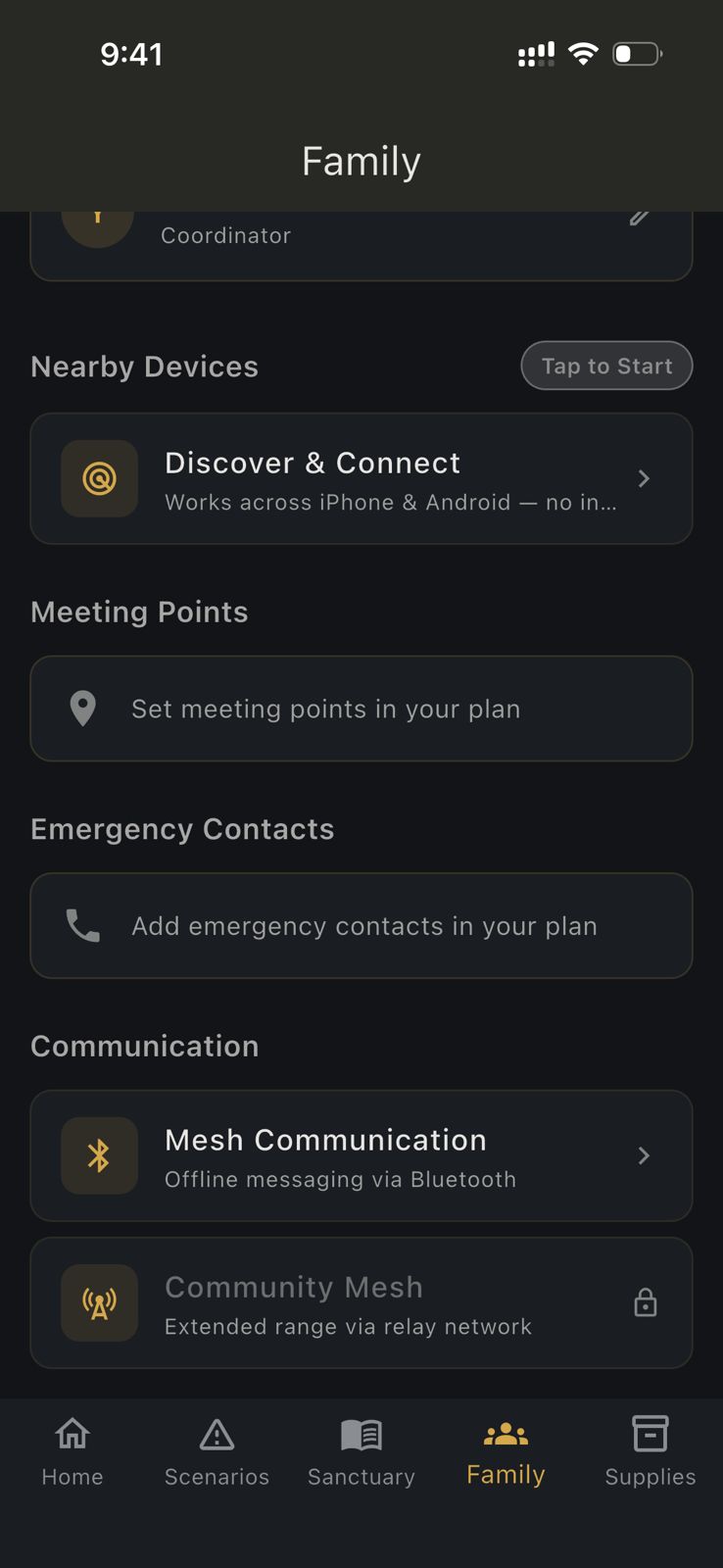
HAVEN is an offline emergency app with Bluetooth mesh messaging built into its Family tab. It works with no internet, no cell signal and no account.
- Text nearby family members over Bluetooth, typically up to about 100 meters, and farther when other HAVEN phones relay the message.
- Share your location with nearby phones over the mesh, plus free one-tap SOS live location and timed trip sharing when you do have a connection.
- Private: mesh messages go phone to phone and are not stored on HAVEN's servers.
- More than messaging: the same app has an offline AI assistant, first aid guides, offline maps and your family emergency plan, so one download covers the whole emergency.
The free plan includes mesh messaging, and Pro is a one-time $29.99 with no subscription. Download HAVEN free on every phone in your household, then test it once in Airplane Mode with Bluetooth on.
Other Bluetooth messaging apps
- Bridgefy (iPhone & Android): free Bluetooth messaging that became popular at protests and large events where networks were overloaded. Messaging only.
- Briar (Android only): open-source, private messaging over Bluetooth or local Wi-Fi when the internet is down. Not available on iPhone.
The catch with any mesh app: everyone needs it installed before the network goes down. You can't download an app with no signal, so install it on your family's phones now.
6. Carry a LoRa mesh radio for miles of range
For hikers, rural homes and serious preppers, small LoRa radios running free Meshtastic software pair with your phone over Bluetooth and send short texts over several miles with no cell network, more with radios on hills or rooftops. Each person needs a radio, and it takes some setup, but there is no subscription.
Satellite messengers like the Garmin inReach are another option for remote trips. They work almost anywhere on Earth, but need a monthly plan. Our HAVEN vs Garmin inReach comparison covers when each makes sense.
7. In an emergency: text 911 if you can't call
In many US areas you can text 911. Call if you can, text if you can't, for example if speaking would put you in danger. If text-to-911 is not available where you are, you will get a bounce-back message telling you to call. With no signal at all, use Emergency SOS via satellite if your phone supports it.
How to text without service on iPhone: checklist
- Turn on Wi-Fi Calling (Settings, Phone, Wi-Fi Calling).
- Make sure "Send as SMS" is on (Settings, Messages) so iMessages fall back to texts.
- Try the satellite demo in Settings, Emergency SOS, so you know how to aim the phone.
- Install a Bluetooth mesh app like HAVEN on every family phone.
How to text without service on Android: checklist
- Turn on Wi-Fi Calling (search Settings for "Wi-Fi Calling").
- Switch on RCS chat in Google Messages settings.
- Check Settings, Safety and emergency for Satellite SOS on supported phones.
- Install a Bluetooth mesh app like HAVEN on every family phone.
Make a plan before the network goes down
Phones are only half the answer. Agree with your family where you will meet, who your out-of-area contact is, and which app you will use if there's no signal. Our family emergency plan template walks you through it in 20 minutes, and the family emergency communication plan covers what to do when phones fail completely.
Download HAVEN free and set up mesh messaging on every phone in your family today. It takes two minutes now, and it's the one way to reach each other when there's no service, no Wi-Fi and no internet. See what Pro adds, from a one-time $29.99.
---
Feature availability for Wi-Fi Calling, RCS and satellite messaging depends on your phone, carrier and country. In a life-threatening emergency, always contact your local emergency number first.
FAQ
Q: Can you text without service?
A: Yes. With Wi-Fi you can use Wi-Fi Calling, iMessage, RCS or WhatsApp. With a clear view of the sky, newer phones can text by satellite. With no network at all, Bluetooth mesh apps like HAVEN let you text nearby phones directly.
Q: How do I text without service or Wi-Fi?
A: Use satellite texting if your phone and carrier support it, or a Bluetooth mesh messaging app such as HAVEN, Bridgefy or Briar. Mesh apps send messages phone to phone, so everyone needs the app installed before the network goes down.
Q: How do I text without service on iPhone?
A: Turn on Wi-Fi Calling or use iMessage if you have Wi-Fi. On iPhone 14 and later, use Emergency SOS via satellite or, on iOS 18 and later, Messages via satellite in supported regions. With no network at all, use a Bluetooth mesh app like HAVEN.
Q: How do I text without service on Android?
A: Turn on Wi-Fi Calling and RCS chat if you have Wi-Fi. Some newer Pixel and Galaxy phones and some carriers support satellite texting. With no network at all, use a Bluetooth mesh app like HAVEN or Briar.
Q: Is there an app to text without service?
A: Yes. Bluetooth mesh apps such as HAVEN (iPhone and Android), Bridgefy and Briar (Android) send texts directly between nearby phones with no cell service or internet.
Q: How far can Bluetooth mesh messages reach?
A: Usually around 100 meters between two phones, depending on walls and terrain. In HAVEN, messages can reach farther when other HAVEN phones in between relay them.
Ready to get prepared?
Carry on-device AI advice, offline topographic maps, and 12 printable field manuals on your phone with zero cell signal needed.